Essential Eight Maturity Level 2 vs ML3: What's Actually Different?
5/8/2026 · Compliance365
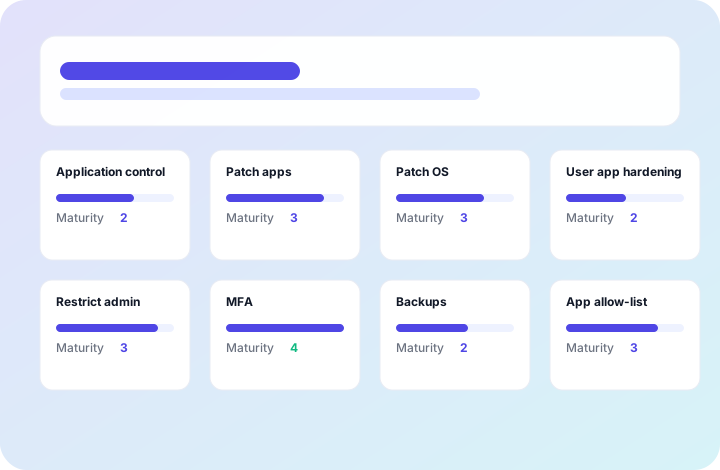
The Australian Cyber Security Centre's Essential Eight Maturity Model defines three maturity levels. In practice, most organisations target ML2 — either because it's what government procurement requires, or because ML3 feels abstract and expensive.
This post explains what materially changes between ML2 and ML3, which organisations genuinely need ML3, and what the real uplift looks like in a Microsoft 365 environment.
What ML2 actually requires
At Maturity Level 2, the core intent is that security controls are consistently applied and harder to bypass with targeted attacks. The key characteristics:
- Controls are applied to internet-facing systems and workstations specifically (not just “somewhere in the environment”)
- Attack resistance is oriented toward targeted adversaries using commodity techniques and some custom tooling
- Controls are enforced, not just documented — a policy that says “we do MFA” doesn’t satisfy ML2 if MFA isn’t actually enforced everywhere required
For the Microsoft 365 environment, reaching ML2 typically means having Conditional Access policies that enforce MFA universally (with no bypass exceptions), application control via AppLocker or WDAC, Privileged Identity Management activated with time-bound admin access, and automated patching within 14 days of release for internet-facing services.
What genuinely changes at ML3
ML3 is oriented toward resistance to sophisticated, persistent adversaries — nation-state-level actors and advanced criminal groups. The key shifts:
1. All environment coverage, not just internet-facing
ML2 allows you to scope controls to internet-facing systems and workstations. At ML3, controls apply across the entire environment — including internal systems, legacy infrastructure, and operational technology where it exists. This is the single largest driver of ML3 uplift effort and cost.
2. Phishing-resistant MFA everywhere
ML2 accepts any strong MFA method — including TOTP authenticator apps. ML3 requires phishing-resistant MFA specifically — FIDO2 hardware keys or certificate-based authentication — for all accounts, including privileged accounts accessing sensitive data. This typically requires deploying Windows Hello for Business or hardware security keys (YubiKey, etc.) across the organisation.
3. Shorter patching windows
ML2 requires patching internet-facing services within 14 days of release and other systems within 30 days. At ML3, the windows tighten: 48 hours for vulnerabilities rated critical or higher in internet-facing services, and 2 weeks for all other systems. This requires mature vulnerability management tooling and an automated patching pipeline that most organisations don’t have at ML2.
4. Just-in-time privileged access
ML2 requires that privileged accounts are minimised and don’t have internet access. ML3 requires just-in-time (JIT) privileged access — privileges are granted for specific tasks and automatically revoked afterward. In Microsoft 365, this is implemented via Privileged Identity Management with zero standing access: admins request access for a defined window, it’s approved or auto-approved based on policy, and it expires. Most M365 E5 tenants can achieve this without additional tooling.
5. Application control validation
ML2 requires application control (AppLocker or WDAC) applied to prevent unapproved applications running. ML3 adds a requirement to validate application control rules through independent testing — not just deploying policy, but actively confirming that the controls can’t be bypassed by commonly used attacker techniques.
Who actually needs ML3
ML3 is required or strongly expected in a small set of situations:
Australian Government (Cabinet and SECRET systems). The PSPF (Protective Security Policy Framework) aligns ML3 with systems handling Cabinet-in-confidence or sensitive national security information. If your organisation processes or handles this category of information, ML3 is the baseline expectation.
Critical Infrastructure under the SOCI Act. Critical Infrastructure entities (energy, water, financial system, communications, etc.) in sectors with heightened obligations often need to demonstrate ML3 to satisfy their CIRMP (Critical Infrastructure Risk Management Program). ACSC guidance explicitly references ML3 in this context.
Defence contractors handling classified or sensitive compartmented information. DISP (Defence Industry Security Program) membership requirements for the higher classifications align with ML3. If your contracts involve handling PROTECTED or above material, ML3 controls are expected.
High-value commercial targets. Some ASX 50 and ASX 100 companies in financial services, resources, and infrastructure pursue ML3 proactively because their risk profile (large sensitive datasets, significant regulatory exposure, sophisticated threat actors motivated to target them) justifies it. These are voluntary decisions, not regulatory mandates.
For most mid-market Australian organisations without specific classified information handling obligations, ML2 is the appropriate and sufficient target. Pursuing ML3 when ML2 satisfies procurement requirements is an expensive use of security budget that diverts from higher-impact improvements elsewhere.
The practical ML3 uplift from ML2
For an organisation already at ML2 in a modern Microsoft 365 E5 environment, the ML3 uplift typically involves:
| Area | ML2 state | ML3 uplift required |
|---|---|---|
| MFA | Enforced via Conditional Access (any strong MFA) | Phishing-resistant MFA (FIDO2 / WHfB) deployed universally |
| Application control | AppLocker/WDAC deployed for internet-facing + workstations | Policy validated via independent testing across full environment |
| Patching | 14d for internet-facing, 30d for others | 48h for critical CVEs (internet-facing), 14d for all others |
| Privileged access | No standing admin access, no internet access | JIT via PIM, zero standing access, validated |
| Coverage scope | Internet-facing + workstations | All systems, including internal and legacy |
The most significant effort is usually the phishing-resistant MFA rollout and the full-environment application control validation. In a well-managed M365 E5 environment, ML3 uplift typically takes 8–14 additional weeks beyond ML2.
The most common ML3 gap we see
Organisations that believe they’re at ML3 but aren’t — and there are more of these than you’d expect — almost always have the same gap: scope exceptions that aren’t documented as accepted risk.
ML3 requires full environment coverage with no unexplained gaps. A legacy system that’s “too complex to patch quickly” or a shared account that exists for “operational reasons” isn’t a gap — it’s a failure to meet the maturity level. At ML2, the assessor will note it. At ML3, it will result in a downgrade.
If you’re targeting ML3 for a government tender or SOCI compliance, get your assessor’s specific gap list before the formal assessment, not during it.
Targeting Essential Eight ML2 or ML3? We deliver assessments and maturity uplift inside your existing Microsoft 365 environment — fixed-price, evidence-backed, and scoped to what you actually need rather than what looks impressive on paper.
A 30-minute call will tell you where you sit today and what genuine ML2 or ML3 readiness looks like for your environment.
Found this useful? Get the ISO/Privacy/AI readiness checklists.
Browse resources